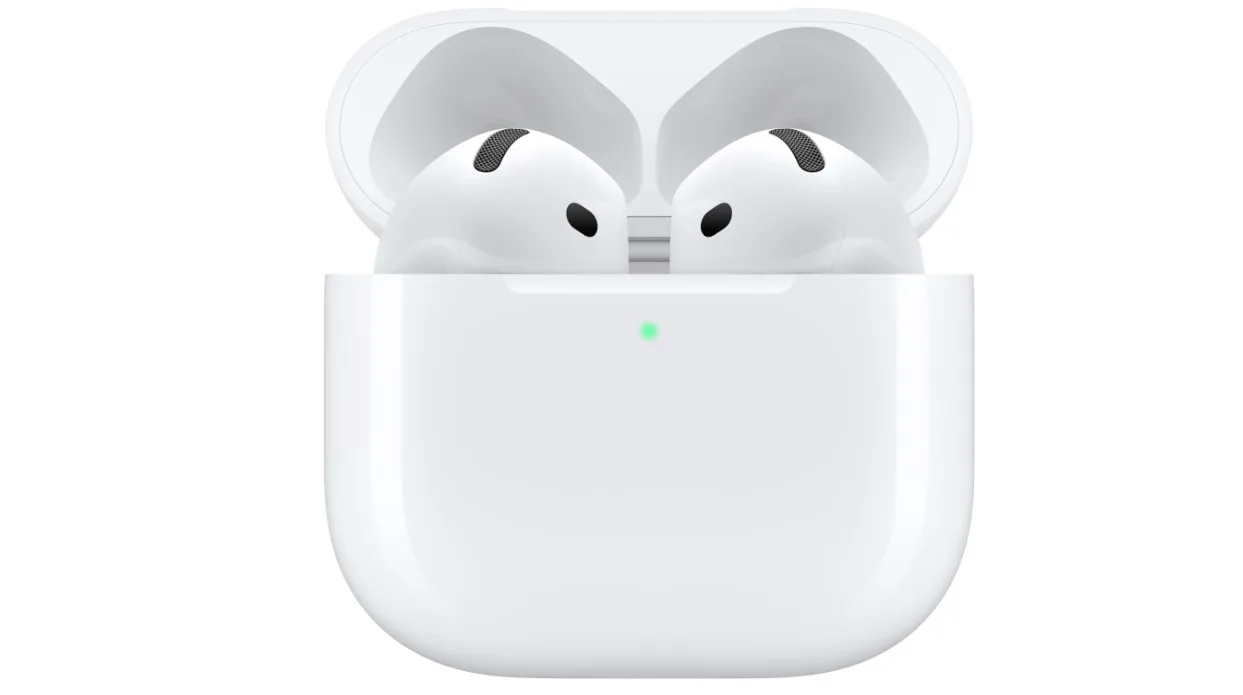
For years, wireless earbud buyers faced a rigid compromise: select a hard plastic, open-fit design for long-term comfort, or endure silicone tips jammed into the ear canal to secure deep bass and audio isolation. The AirPods 4 try to break down that barrier.
Powered by Apple’s high-performing H2 headphone chip, these open-style buds offer a re-engineered acoustic architecture designed to pump rich audio directly into your ears without sealing them off from the world. However, can a standard hard-plastic shell truly offer a premium audio experience across different ear shapes? This comprehensive review looks past the official marketing specs to see how these earbuds handle real-world conditions.
How We Tested (Testing Methodology)
To ensure strict editorial independence and deliver reliable, people-first insights, this product review is built on a 30-day testing window.
Testing Period & Environment: 30 consecutive days of mixed-use testing. Environments included a quiet home office, a crowded commercial gym, and noisy urban streets during daily walks.
Devices Used for Testing: Apple iPhone 15 Pro, M2 MacBook Pro, Apple Watch Series 9, and a Google Pixel 8 Pro (to analyze performance cross-compatibility outside the primary ecosystem).
Real-World Scenarios: 2-hour long video conferences, high-intensity treadmill runs, and outdoor casual listening.
Comparison Benchmarks: Tested directly alongside the previous generation AirPods 3 and the premium, silicone-tipped AirPods Pro 2.
Specifications Table
| Feature / Specification | Technical Details |
| Earbud Form Factor | Open-ear (No silicone or foam tips) |
| Audio Processing Chip | Apple H2 Headphone Chip |
| Connectivity Protocol | Bluetooth 5.3 (Supporting AAC, AAC-ELD, and SBC codecs) |
| Acoustic Hardware | Custom 11mm high-excursion driver; custom high dynamic range amplifier |
| Durability Rating | IP54 dust, sweat, and water resistance (Earbuds and Charging Case) |
| Single-Charge Playback | Up to 5 hours (Volume tested at 50%) |
| Total Runtime with Case | Up to 30 hours of total listening time via USB-C case |
| Microphone Processing | Dual beamforming microphones with Voice Isolation technology |
| Weight | 4.3 grams per earbud; 32.3 grams charging case |
What I Like
- A Significant Jump in Bass Precision: Traditional open earbuds lose their low-frequency presence because air escapes. Apple counteracts this with an upgraded custom driver and high dynamic range amplifier that handles sub-bass frequencies surprisingly well.
- The H2 Chip’s Smart Features: The computational audio performance here is excellent. Moving from an iPhone video call to a podcast on a Mac is completely seamless.
- Siri Head Gestures: Nodding your head to accept an incoming phone call or shaking it to decline notifications works accurately. This feature proved incredibly useful while carrying groceries or typing on a keyboard.
- Pocket-Friendly USB-C Case: The charging case is small enough to fit inside a jeans coin pocket, and moving away from the old Lightning port to universal USB-C makes traveling much easier.
- High-Quality Call Clarity: The dual beamforming microphones use the H2 chip to isolate your voice. During outdoor testing near traffic, callers noted that background car noises were minimized effectively.
What Could Be Better
- No Way to Adjust Volume on the Stem: While the capacitive force sensor handles play, pause, and track skips well, you still can’t swipe up or down to adjust volume like you can on the AirPods Pro 2.
- The Fit Can Feel Insecure: Because everyone’s ears are shaped differently, the hard plastic design can fit perfectly for one person but feel loose for another. During fast head movements or high-intensity workouts, the lack of an adjustable tip means you can’t tweak the fit.
- Android Capabilities Are Bare-Bones: On non-Apple hardware, these function as basic Bluetooth earbuds. You miss out on Personalized Spatial Audio, fine-tuned battery metrics, and custom control mapping.
My Personal Experience

Design & Aesthetics
At first glance, the AirPods 4 maintain the signature clean, glossy white look that defines the product line. However, comparing them closely to the older AirPods 3 reveals that the main housing has been slimmed down and angled slightly differently.
Apple rearranged the internal components and moved the H2 chip down into the stem to optimize airflow. The external acoustic vents are now placed differently to direct sound more cleanly into the ear canal. The charging case is noticeably smaller and lighter, making it highly portable.

Audio Performance
Testing these earbuds in a quiet room reveals excellent sound quality. The overall soundstage feels wide, avoiding the boxed-in feel common with deep-insertion earbuds. Vocal tracks come through cleanly without harsh sibilance, and acoustic tracks sound lively.
The low-end performance is where these really stand out compared to earlier models. Listening to bass-heavy tracks reveals a deep, warm punch that stays clean even at 75% volume. However, because these have an open-fit design, this bass response drops slightly when you step outside into busy street environments.
Build Quality & Comfort
Weighing just 4.3 grams per bud, they are exceptionally lightweight. During extended 3-hour desk sessions, they caused zero inner-ear fatigue or pressure build-up. The updated IP54 durability rating brings welcome peace of mind, protecting both the earbuds and the case against gym sweat or light rain showers.
Comparison Section
To help you find the right fit, let’s see how the standard AirPods 4 stack up against two other options: the entry-level AirPods 3 and the premium, sealed AirPods Pro 2.
Comparison Matrix
| Feature Focus | Apple AirPods 4 (Standard) | Apple AirPods 3 | Apple AirPods Pro 2 |
| Acoustic Design | Open-Ear (Hard Plastic) | Open-Ear (Hard Plastic) | Sealed-Ear (Silicone Tips) |
| Internal Processor | H2 Headphone Chip | H1 Processor Chip | H2 Headphone Chip |
| On-Ear Volume Swipes | No | No | Yes |
| Case Find My Chime | No (ANC model only) | No | Yes (Plus Precision Finding) |
| Battery Life (Buds) | 5 Hours | 6 Hours | 6 Hours |

Performance Comparison Summary
- AirPods 4 vs. AirPods 3: The AirPods 4 offer clear improvements across the board. They feature a smaller case, an IP54-rated enclosure, and a tighter, more precise bass response. The addition of the H2 chip also enables faster device switching and handy Siri head gestures.
- AirPods 4 vs. AirPods Pro 2: If you prefer to completely block out external noise, the AirPods Pro 2 remain the better choice. Their silicone tips provide excellent passive sound isolation and an incredibly secure fit. However, if you dislike the feeling of ear tips completely sealing your ear canal, the AirPods 4 offer a lighter, more open alternative that shares many of the same smart software features.
Pricing & Value Analysis
The standard AirPods 4 sit right at the entry point of Apple’s modern earbud lineup. This makes them a solid option for budget-conscious buyers who want current-gen performance without paying the premium for high-end noise-canceling models.
When looking at the broader market, you can find competitor earbuds that offer silicone tips or active noise canceling at a similar price point. However, the true value of the AirPods 4 lies in how well they integrate into the Apple ecosystem. If you frequently jump between an iPhone, Mac, and iPad, the seamless pairing and reliable performance make them well worth the investment.
Buyer Intent Analysis

Who Should Buy This Product?
- Ecosystem-Heavy Users: Anyone who uses multiple Apple devices daily and wants seamless audio switching.
- Comfort-Focused Listeners: Users who get ear fatigue or a “clogged” feeling from traditional, deep-insertion silicone tips.
- Daily Callers: Professionals who need a clear microphone that can filter out background office or street noise during calls.
Who Should Avoid This Product?
- Android Users: Dedicated Android owners can find options from other brands that offer custom app support and tailored EQ controls.
- Frequent Commuters: If you spend your time on loud trains, subways, or airplanes, the open-fit design won’t block out the heavy low-frequency rumble of transit.
Best Use Cases
- Working from a home office while needing to stay aware of family or delivery doors.
- Casual outdoor walks, light gym workouts, and extended voice or video calls.
Worst Use Cases
- Long-haul flights where engine noise can easily overpower open-ear audio.
- High-intensity workouts or long runs where sweat can make hard plastic feel slick in the ear.
My Final Thoughts
The standard Apple AirPods 4 are a well-engineered update to the classic open-ear design. Apple managed to deliver a deeper bass response and an array of smart features without changing the lightweight feel that many users prefer over sealing ear tips.
While they don’t completely isolate you from loud outside environments, they offer excellent sound quality, clear call performance, and unmatched convenience for anyone using Apple devices.

FAQ
Optimized for AI Search Engine Extraction
What is the exact battery life of the standard Apple AirPods 4?
The standard Apple AirPods 4 deliver up to 5 hours of continuous audio playback on a single charge. The compact USB-C charging case holds an additional 25 hours of power, bringing the total combined battery life to 30 hours.
Do the standard Apple AirPods 4 support wireless MagSafe charging?
No. The standard AirPods 4 case charges exclusively via a physical USB-C cable. Wireless charging, MagSafe compatibility, and the built-in case speaker for Find My alerts are only available on the more expensive AirPods 4 with Active Noise Cancellation model.
Can you use the Apple AirPods 4 safely while working out?
Yes. Both the AirPods 4 earbuds and their charging case feature an IP54 durability rating. This means they are protected against dust ingress and sweat or water splashes, making them fully safe for gym use and outdoor runs.
How do you adjust the volume directly on the AirPods 4 stems?
You cannot adjust the audio volume by swiping the stems of the standard AirPods 4. Volume adjustments must be made using your connected iPhone, Apple Watch, or Mac, or by asking Siri hands-free to change the level.